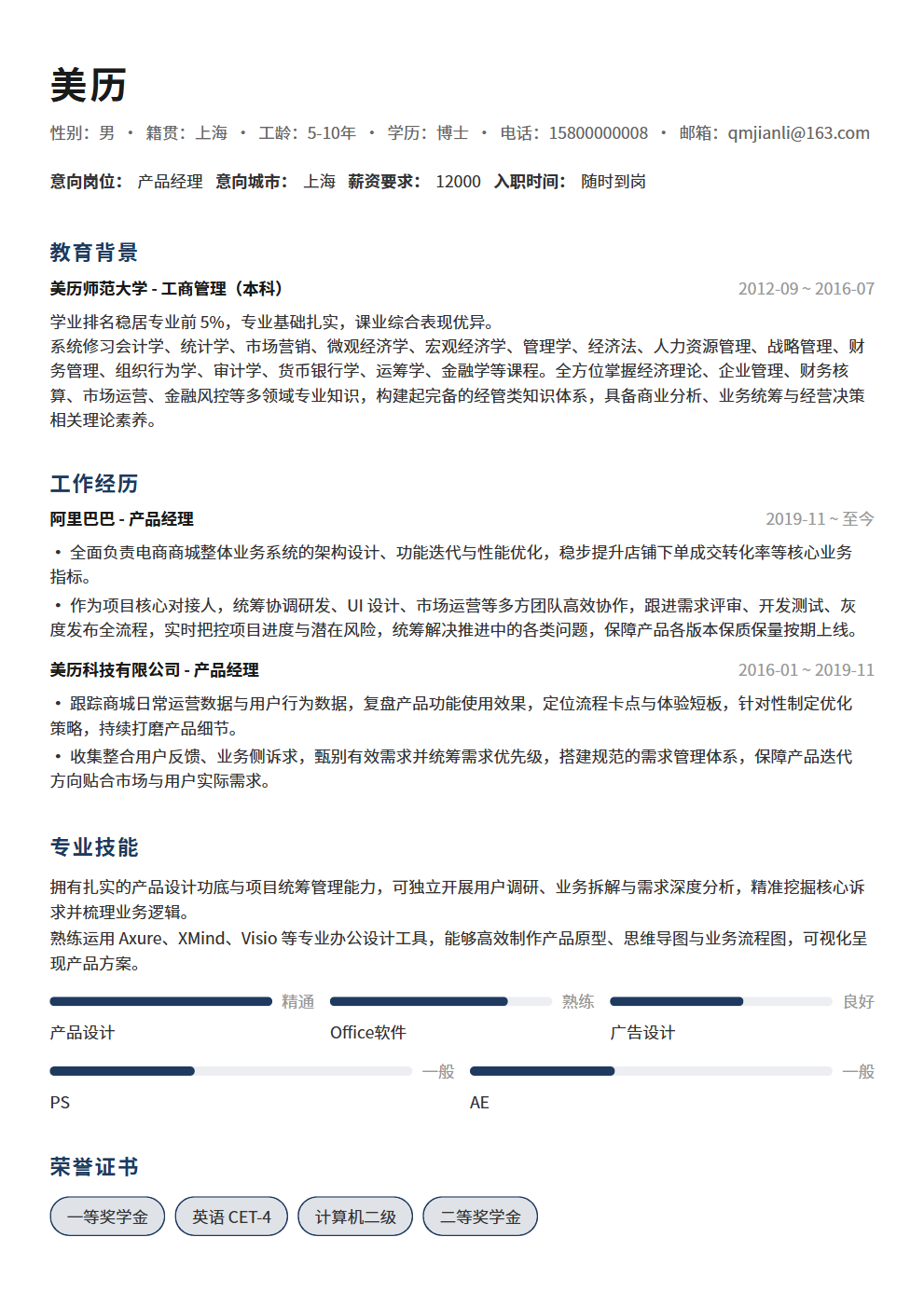
Resume Layout Design Principles: 5 Visual Techniques That Make HR Want to Interview You Immediately
No matter how strong your resume content is, messy formatting will turn HR away. 5 visual design principles—white space, alignment, hierarchy, typography, and color—help you create a professional resume that lets HR grasp key points in 6 seconds.
HR Spends Only 6 Seconds — Layout Determines Whether Your Resume Gets Read or Tossed
Research shows that HR professionals spend an average of just 6 seconds scanning a resume. What can they see in 6 seconds? The layout. If the formatting is chaotic, information is crammed together, and key points are buried, HR won't bother digging into your content. Resume layout isn't about looking "pretty" — it's about whether your resume can actually be read. No matter how strong your content is, poor formatting is like burying gold in a landfill. These 5 visual design principles will help you create a professional resume where HR can immediately spot what matters.
Principle 1: White Space — A Resume Is Not a Fill-in-the-Blank Test, Keep Information Density at 70%
Many people try to fill every inch of space on their resume, thinking white space is wasteful. The opposite is true — white space is the soul of resume layout. An information density of around 70% works best: leave 30% of each page as blank area so the content can breathe. Practical steps for white space: set margins to at least 1.5 cm, leave clear spacing between sections, and add line spacing between individual entries. A resume without white space reads like dense contract fine print — HR instinctively wants to skip it. Remember, the core purpose of resume layout is to guide the reader's eyes, not to fill every pixel.
Principle 2: Alignment — Left-Aligned Is the Only Right Answer, Center-Aligned Is HR's Nightmare
Alignment is the foundation of a professional-looking resume. Left alignment is the golden rule — all body text should be left-aligned. Section headers can be centered or left-aligned, but body text should never be centered. Center-aligned resumes have terrible reading efficiency because the eye has to re-locate the starting position on every new line — HR simply can't finish reading in 6 seconds. Right alignment is even worse; that's a letter format, not a resume format. Alignment checklist: name and contact info aligned, section headers aligned, company names and job titles aligned, dates right-aligned or consistently positioned. A resume with inconsistent alignment instantly signals "unprofessional" to HR.
Principle 3: Information Hierarchy — Use Font Size, Weight, and Spacing to Build Visual Layers
Your resume's information hierarchy determines whether HR can quickly find what they're looking for. The rules for building visual hierarchy are straightforward: your name should be the largest and most prominent element, section headers come next, company names and job titles should be bolded, and body text should be the smallest and lightest. Suggested parameters: name at 18–22pt bold, section headers at 14–16pt bold, company names and titles at 11–12pt bold, body text at 10–11pt regular. Beyond font size and weight, spacing is another critical tool for hierarchy — leave larger spacing above section headers, smaller spacing between headers and body text, and medium spacing between different entries. A resume with clear hierarchy lets HR scan once and immediately spot your core strengths.
Principle 4: Typography — Use Microsoft YaHei/Source Han Sans for Chinese, Arial/Calibri for English
Font choice directly impacts your resume's professional feel. For Chinese resumes, Microsoft YaHei or Source Han Sans are recommended — both display clearly on screens and have a modern feel. SimSun is too formal and dated, KaiTi is too literary for resumes, and decorative or artistic fonts should never be used. For English resumes, Arial or Calibri are ideal — clean, crisp sans-serif fonts work best. Use no more than 2 fonts across the entire resume: one for Chinese and one for English, or one for headers and one for body text. Limit font sizes to 3 variations — too many sizes make the resume look cobbled together. Finally, ensure fonts display correctly across devices by submitting as PDF, avoiding font substitution that can break your layout.
Principle 5: Color — Stick to Black, White, and Gray, Add at Most One Accent Color
A resume is not a PowerPoint presentation — it doesn't need a rainbow of colors. The color principle for professional resumes: use black, white, and gray as the primary palette, with at most one accent color. Use the accent color only for section headers, divider lines, or key information — for example, dark blue for section headers or light gray for background blocks. Never use more than 3 colors, avoid high-saturation neon colors, and skip gradients entirely. Color is the easiest element to get wrong in resume design — good color choices add polish, bad ones get you eliminated. If you're not confident about color, stick with pure black, white, and gray. Simplicity never fails. Remember, HR is reading your content, not admiring your design — color should serve the content, not steal the spotlight.
Comparing 3 Classic Resume Layout Templates
Different layout templates suit different job search scenarios. Choosing the right template matters as much as writing the right content:
- Single-column: The most classic resume layout with all content arranged top to bottom. Best for candidates with extensive experience presented chronologically. Pros: smooth reading flow, high information density. Cons: can look visually monotonous.
- Two-column: Auxiliary information (skills, education, personal details) on the left, core content (work experience) on the right. Best for skills-oriented roles (design, tech, product). Pros: clear information categorization, visual balance. Cons: low space efficiency, not ideal for candidates with extensive experience.
- Hybrid: Core experience displayed in a single column, skills and supplementary information in a sidebar or bottom section. Combines the information density of single-column with the visual hierarchy of two-column — currently the most recommended layout style.
Good Layout Makes Your Content Visible
The essence of resume layout isn't decoration — it's enabling HR to grasp your core value within 6 seconds. White space gives your resume breathing room, alignment creates order, hierarchy makes key points visible, typography improves readability, and color naturally conveys professionalism. Nail these 5 principles and your resume already outperforms 80% of candidates. If you don't want to spend hours tweaking formatting, try BeautyResume's smart layout engine — apply professional formatting with one click, automatically handling white space, alignment, hierarchy, and typography so you can focus on your content and effortlessly create a resume that makes HR want to interview you on the spot.