4 Principles of Resume Layout Design: What a Resume That HR Falls in Love with at First Sight Looks Like
Good resume content but ugly layout? 4 layout design principles — F-pattern visual flow, clear information hierarchy, breathing space with whitespace, consistent style. 3 layout styles for different industries, 3 layout pitfalls to avoid, and recommended layout tools.
Your resume content is actually well-written — work experience has data, project results have highlights, skill descriptions are professional enough. But when you send it to a friend for review, they say "the layout is... hard to describe." You're unconvinced, send it to 20 companies, and the response rate is under 10%. What's the problem? The content is fine; the layout is the issue. The first impression HR gets from a resume isn't "is the content good" but "is the layout comfortable" — a resume with chaotic layout makes HR not even want to read further, let alone discover your content highlights. Resume layout isn't "icing on the cake" — it's a "threshold requirement." If the layout doesn't pass, even the best content goes to waste.
Principle 1: F-Pattern Visual Flow — Follow HR's Reading Habits
Do you know how HR's eyes move when reading resumes? According to eye-tracking research, people's eye movement patterns when reading webpages follow an "F" shape — first scanning horizontally across the top, then moving down and scanning horizontally across the middle area, and finally browsing vertically down the left side. Resumes are the same — HR's eyes first scan across the top, then browse down the left side, occasionally looking right for detailed content. If your resume layout doesn't follow the F-pattern, HR's eyes will "get lost" and key information will be missed.
- Bad example: Resume titles and key information placed on the right or center, with decorative elements or blank space on the left — HR's eyes start scanning from the left but find no useful information there, and all key information gets missed
- Good example: Resume titles, company names, position names and other key information placed on the left, with specific descriptions and achievement data on the right — as HR's eyes browse down the left, they can quickly grasp the core information of each experience section
- 3 applications of the F-pattern: First, place the most important information in the top 1/3 of the resume — this is where HR's eyes linger longest; Second, place each experience section's title (company name + position) on the left, with description content on the right — HR can quickly locate each experience when scanning down the left; Third, present key data and achievements in bold or standalone lines — HR can immediately spot highlights when looking right
- Specific operation: Place name and core tags at the top (like "5-year Product Manager | User Growth Expert | 0-to-1 Product Experience"), followed by work experience, with each section formatted as "left: company name + position + dates, right: core achievement bullet points" — HR gets maximum information efficiency when browsing along the F-pattern
- Note: The F-pattern doesn't mean cramming all information on the left — it means placing "navigational information" (titles, tags, keywords) on the left and "detailed content" on the right. Left is the table of contents; right is the body — HR reads the contents first, then the body
The essence of the F-pattern visual flow: follow human reading habits rather than fighting them. HR reads hundreds of resumes daily — they won't change their reading style for your resume. Your layout must adapt to their habits, not the other way around.
Principle 2: Clear Information Hierarchy — Let HR Distinguish Primary from Secondary at a Glance
Have you seen those resumes that are "a full page of text, can't distinguish headings from body, can't find where the key points are"? This is a classic example of confused information hierarchy. Clear information hierarchy means letting HR immediately distinguish: which are headings, which are body text, which are key points, which are supplementary. A resume with clear hierarchy lets HR grasp core information with one scan; a resume with confused hierarchy leaves HR reading 3 times without knowing what you did.
- Bad example: Entire resume uses the same font, same size, same weight — no distinction between headings and body, no distinction between key and secondary information, HR's eyes have nowhere to land
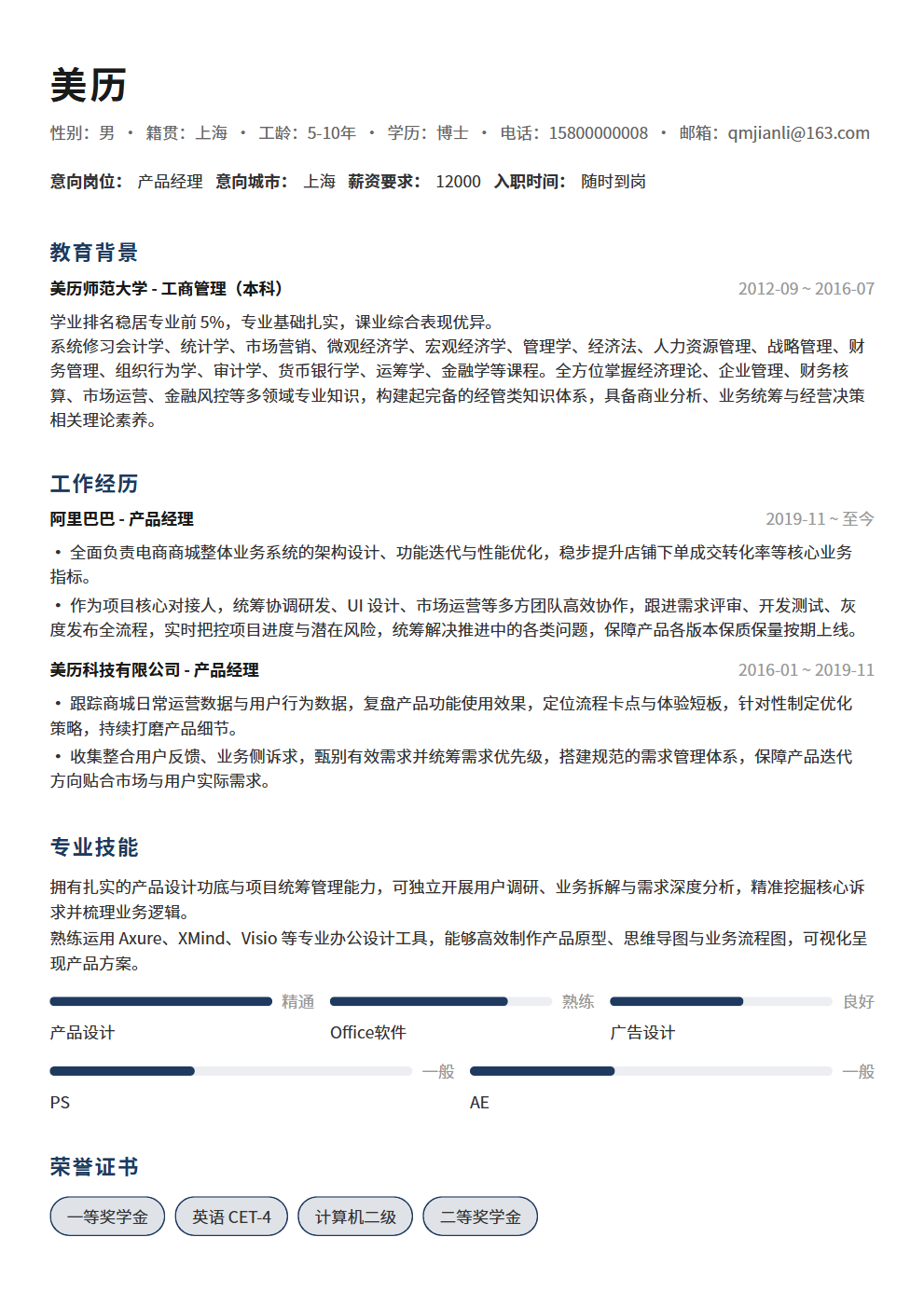
- Good example: Name in 18pt bold, section headings in 14pt bold, company names and positions in 12pt bold, body text in 11pt regular, auxiliary information in 10pt gray — 5 levels, and HR can immediately grasp the primary-secondary relationship of information
- 4 dimensions of information hierarchy: font size (large → small, at least 3 levels), font weight (bold → regular, core info bold), color (dark → light, no more than 2 colors), spacing (larger spacing between sections, smaller spacing between bullet points)
- Most effective hierarchy design: Section headings use triple emphasis of "bold + underline + whitespace above" — HR can see at a glance how many sections the resume has and what each section is. Key data and achievements in body text highlighted in bold — "User growth 280%" catches the eye more than "User growth 280%"
- Hierarchy self-test method: Hold the resume at arm's length and squint — if you can still distinguish headings from body text, the hierarchy is clear enough; if it looks like a gray wall of text, the hierarchy isn't sufficient
The essence of clear information hierarchy: help HR with "information filtering" — in 6 seconds of browsing time, HR can't read your resume word by word; they can only see the "highest-level" information. If your hierarchy design lets HR see the information you most want them to see within 6 seconds, then the hierarchy design is successful.
Principle 3: Whitespace and Breathing Room — Let the Resume "Breathe"
Many job seekers have a misconception: every inch of resume space must be filled with content; whitespace is waste. So resumes are packed densely, line spacing so small that characters touch each other, no spacing between sections — looking like an airtight wall of text. HR's first reaction to this kind of resume isn't "this person has rich experience" but "this is tiring to look at, I don't want to read it." Whitespace isn't wasted space — it gives information room to "breathe." Just like pauses in speech — speech without pauses is suffocating to listen to; rhythmic pauses let people hear each key point clearly.
- Bad example: 1.0x line spacing, no spacing between paragraphs, no separation between sections — the entire resume looks like an airtight brick, and HR gets a headache after 3 seconds
- Good example: 1.3-1.5x line spacing, 1 blank line between paragraphs, 2-3 blank lines between sections — the entire resume looks clean and comfortable, and HR's eyes can naturally move from one section to the next
- 3 levels of whitespace: Inter-section whitespace (2-3 blank lines between major sections like work experience, education, skills), inter-point whitespace (0.5-1 blank line between 2-3 bullet points under each work experience), line spacing whitespace (1.3-1.5x line spacing for body text)
- Whitespace principle: More whitespace around important information — just like the most precious exhibits in a museum are always placed alone on a pedestal with ample surrounding space. Your core achievements and key data should be like precious exhibits, with sufficient whitespace to "frame" their importance
- Note: Whitespace ≠ "less content" — a one-page resume can also have excellent whitespace. The key is freeing up space through concise writing and optimized layout, not by removing valuable content. Delete fluff and repetition, and whitespace naturally appears
The essence of whitespace and breathing room: give HR's eyes space to "rest." When information density is too high, attention drops — that's why densely packed resumes actually make HR remember nothing. Appropriate whitespace gives each piece of information a chance to be noticed.
Principle 4: Consistent Style — Make the Resume Look Like "One Cohesive Whole"
Have you seen those resumes with "Song typeface for headings, Microsoft YaHei for body, Arial for numbers, bullet points using dots, divider lines using dashes"? These resumes look like patchwork — each part is fine on its own, but together they're just uncomfortable. The reason is simple: inconsistent style. Consistent style means all elements of your resume — fonts, sizes, colors, icons, dividers, bullet points — follow the same design rules, making the entire resume look like "one cohesive whole" rather than "stitched together."
- Bad example: SimHei for headings, Song for body, Times New Roman for numbers, bullet points alternating between dots and dashes, divider lines alternating between solid and dashed — HR thinks this resume was assembled from 3 different templates
- Good example: Entire resume uses the same font family (like Microsoft YaHei), headings distinguished by bold weight, body text in regular weight, bullet points consistently using dots, divider lines consistently using thin solid lines — the entire resume looks clean, unified, professional
- 4 elements of consistent style: Font consistency (no more than 2 fonts across the entire resume, 1 heading font + 1 body font is sufficient), color consistency (no more than 2 colors, black + 1 accent color is sufficient), symbol consistency (bullet points consistent throughout, don't mix dots, dashes, and numbers), spacing consistency (spacing between similar elements should be consistent, not tight in some places and loose in others)
- Safest font choices: Chinese in Microsoft YaHei or Source Han Sans (modern, screen-friendly), English and numbers in Arial or Helvetica (clean, professional). Don't use Song typeface (too traditional, poor screen display), don't use KaiTi (too literary, not professional enough), don't use decorative fonts (too flashy, affects readability)
- Consistent style self-test: Print the resume and look at it from 2 meters away — if it looks like a unified whole, the style is consistent enough; if it looks like parts with different styles stitched together, the style isn't unified enough
The essence of consistent style: conveying "professionalism." A resume with consistent style makes HR think you're someone who "pays attention to detail, has aesthetic sense, and works methodically"; a resume with chaotic style makes HR think you're "careless and unprofessional." Consistent style isn't just a design issue — it's a reflection of professional competence.
3 Layout Styles for Different Industries
Different industries have different preferences for resume layouts — finance prefers a stable professional style, tech prefers a clean modern style, creative industries prefer a personalized design style. Choosing a layout style that matches your target industry makes HR feel "this person understands the industry."
- Style 1: Stable Professional (suitable for finance, consulting, legal, government and other traditional industries). Characteristics: Black-white-gray color scheme, traditional fonts, structured module divisions, minimal decorative elements. This style conveys "stable, reliable, professional." Layout essentials: No colors, no icons, no decorative lines — rely purely on font size and weight for hierarchy. The more traditional the industry, the more "restrained" you should be
- Style 2: Clean Modern (suitable for internet, tech, e-commerce, new consumer and other industries). Characteristics: Black-white + 1 accent color (blue or green), sans-serif fonts, clear module divisions, moderate use of icons and dividers. This style conveys "efficient, modern, professional." Layout essentials: Use 1 accent color to highlight key information (like company names, core data), icons only for section headings (like a briefcase icon before work experience), don't over-decorate
- Style 3: Personalized Design (suitable for advertising, design, media, branding and other creative industries). Characteristics: Bold color schemes (but no more than 3 colors), creative layout arrangements, appropriate design elements. This style conveys "creative, aesthetic, unique." Layout essentials: Creative ≠ flashy — layout can break conventions, but information delivery efficiency cannot decrease. Even the most creative resume must let HR understand your core information within 6 seconds
Style selection principle: It's not "which one you like" but "which one your target industry likes." Your resume is for HR, not for yourself — using personalized design style for a finance position makes HR think you're "not stable enough"; using stable professional style for a creative position makes HR think you "lack creativity." When in Rome, choose the right style.
3 Layout Pitfalls — Stepping on Any One Could Get You Screened Out Immediately
The following 3 layout pitfalls are far more serious than "layout not pretty enough" — they make HR directly judge you as "unprofessional" or "careless," screening you out without even reading the content.
- Pitfall 1: Misalignment and alignment issues. Text not aligned, table lines crooked, inconsistent indentation — these "small issues" are "big issues" in HR's eyes. Alignment is a basic layout skill; if you can't even align properly, HR will question your work quality — "If they can't even align their resume, can they align their reports?"
- Pitfall 2: Chaotic fonts and sizes. 5 different fonts on one page, sizes ranging from 8pt to 16pt — this resume looks like a "copy-paste compilation." HR will think you're "not serious enough" or "have aesthetic issues." 2 fonts and 3-4 sizes throughout is sufficient
- Pitfall 3: Content overflowing the page. Last line of text cut off, table extending beyond page boundaries, page numbers displaying incompletely — these show you didn't even do a "final check." HR will think you're "not careful enough" — "If they didn't even check their resume before sending, can they be careful at work?"
The common thread across all 3 pitfalls: they're not about "design skill level" but about "level of seriousness." HR won't screen you out because your resume isn't pretty enough, but they will judge you as "not serious enough" because of obvious layout errors — in job searching, "not serious enough" is a more fatal label than "insufficient capability."
Layout Tool Recommendations
Not everyone is a designer, and not everyone needs to design a resume from scratch. The following tools can help you quickly create a professionally laid out resume.
- Online resume editors: The most recommended approach — select a template, fill in content, automatic layout, no design skills needed. Good online editors automatically handle fonts, sizes, spacing, alignment — you only need to focus on content
- Word templates: Suitable for people accustomed to Word. But the pain point of Word resume layout is — change one thing, and everything else gets messed up. If using Word, find a template with pre-set layout and only change content, don't touch the layout
- LaTeX: Suitable for STEM and academic background job seekers. LaTeX produces excellent layout but has a high learning curve — if you don't know LaTeX, it's not recommended to learn it just for writing a resume
- Canva: Suitable for creative industry job seekers. Canva has many design-forward resume templates, but be careful not to choose overly flashy ones — the core of a resume is information delivery, not visual design
- Figma: Suitable for designers. Figma can produce very refined resumes, but if you're not a designer, using Figma for resume creation is overkill
Regardless of the tool, remember one principle: tools are means, content is the end. Don't spend too much time on layout — choose a good template, fill in good content, check 3 times for errors, and you're ready to submit. The importance of layout is "not holding you back," not "becoming a bonus point."
Conclusion: Good Layout Is "Invisible" — It Lets HR Only See Your Content
The 4 principles of resume layout design — F-pattern visual flow following HR's reading habits, clear information hierarchy making primary and secondary obvious at a glance, whitespace breathing room letting information breathe, and consistent style conveying professionalism — all essentially do the same thing: keep HR's attention focused on your content rather than being distracted by layout issues. The best layout is "invisible" — after reading your resume, HR remembers your work results and data, not "this resume has nice layout" or "this resume's layout is terrible." 3 industry styles help you choose the right direction, 3 layout pitfalls help you avoid fatal mistakes, and layout tools help you get started quickly. Remember: layout is the resume's "packaging," content is the resume's "product" — poor packaging means nobody opens it no matter how good the product is; but great packaging with a poor product means no repeat customers. Do content well first, then do layout well — both are indispensable.
Want professional resume layout without the hassle? Use BeautyResume resume editor, with built-in F-pattern visual flow layout, smart information hierarchy design, and industry-specific templates — finance professional style, internet clean style, creative personalized style at the click of a button, automatically handling fonts, spacing, and alignment, making your resume impeccable from layout to content.