How to Choose a Resume Template: 6 Layout Mistakes That Make HR Toss Your Resume
Choosing the wrong resume template means wasting your applications! Avoid 6 major pitfalls like flashy layouts, information overload, and ATS incompatibility to double your pass rate.
1. Flashy Templates: Design Sense ≠ Professionalism
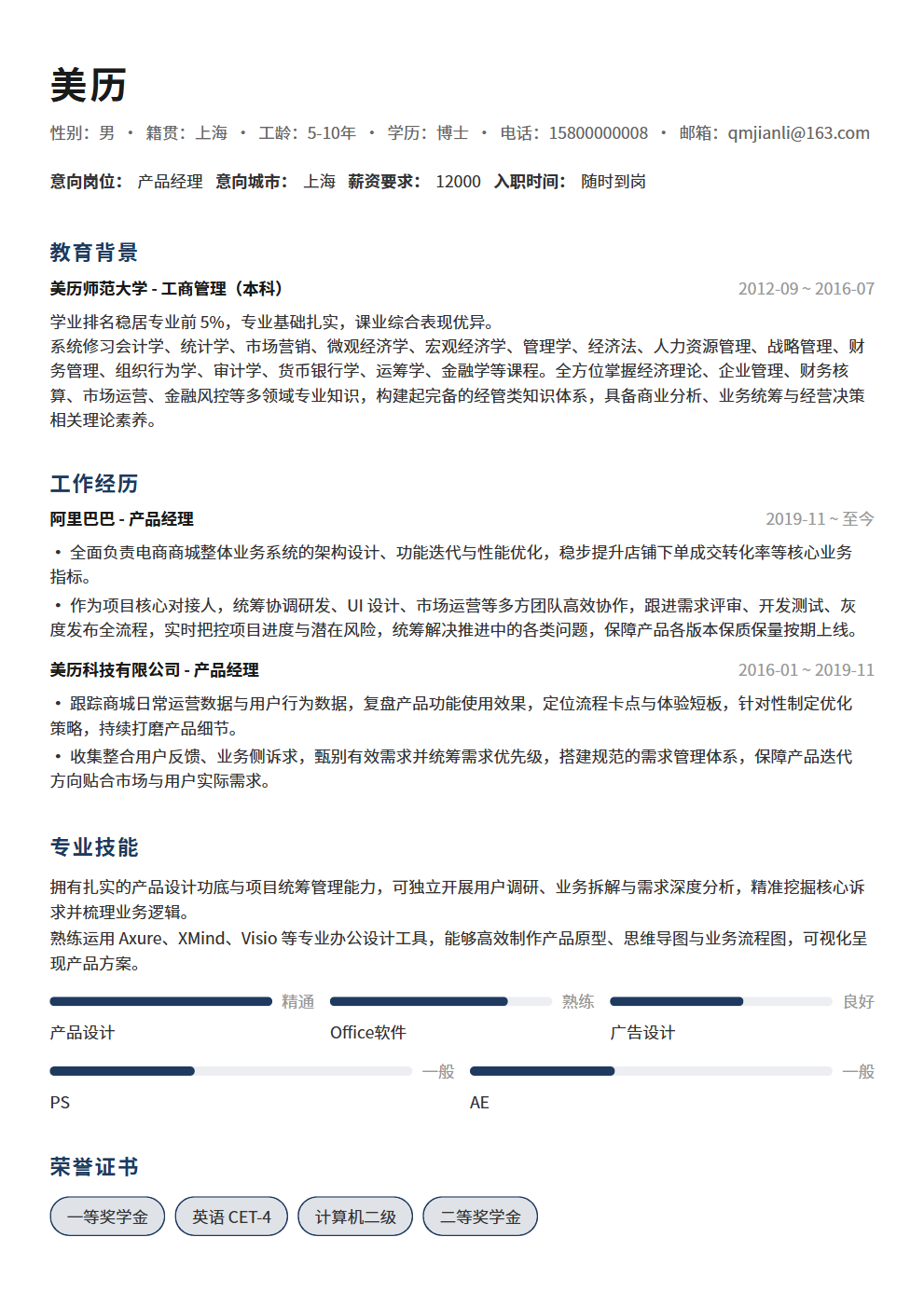
Many job seekers, especially fresh grads, love "creative resume templates" with icons, progress bars, and colorful backgrounds. Unless you're applying for a design role, these templates do more harm than good:
- Icons and decorations waste valuable space, squeezing out truly important content
- Skill progress bars are meaningless — what does "English 80%" even mean? HR can't judge
- Colorful backgrounds and flashy fonts distract from information, increasing HR's reading burden
First principle of resume templates: Content is king; layout serves content. A good template should be "invisible" — HR sees your information, not the template itself.
Special note: If you're applying for a design role, your resume is itself a portfolio piece. You can add some design flair, but the core principle remains — design serves information delivery, not showing off. A design resume where HR can't find your contact info after searching is useless no matter how beautiful it looks.
2. Two-Column Layouts: An ATS Nightmare
Two-column layouts look information-dense and professional, but they're the biggest enemy of ATS systems:
- Most ATS reads text left-to-right, top-to-bottom — two columns scramble the information order
- Company names in the left column and work descriptions in the right may get incorrectly merged
- Keywords may be split across columns, causing matching failures
If you're applying to companies that use ATS screening (nearly 100% of large companies do), a two-column resume might not even pass the first round. Single-column layout is the safe choice.
Some ask: "Can I prepare two versions — single-column for ATS and two-column for HR?" Theoretically yes, but it's easy to mix them up in practice. Plus, two-column layouts read poorly on mobile — when HR views your resume on a phone, columns stack vertically, making the information order even more chaotic. So consistently using single-column layout is the safest approach.
3. Information Overload: Filling Two Pages ≠ Strong Capability
Some people think a packed resume shows rich experience, so they cram every job with dense text. This is the opposite extreme:
- HR spends an average of 6 seconds scanning — information overload means no focal point
- Key achievements get buried in irrelevant details
- Dense text causes visual fatigue, leading HR to skip it entirely
Right approach: 3-5 bullet points per work experience, keeping only the most impressive results. Better to have white space than fill pages with irrelevant information.
A practical test: after finishing your resume, step back and squint at the overall layout. If all you see is dense text with no visual breathing room, you have information overload. An ideal resume layout has clear visual hierarchy — obvious spacing and distinction between headings, body text, and bullet points, so HR can instantly capture key information.
4. Font and Formatting Pitfalls
Font choice may seem minor but significantly affects professionalism:
- Don't use more than 2-3 fonts: One for headings, one for body text is enough
- Don't use decorative fonts: Script and display fonts don't belong on resumes
- Clear size hierarchy: Name largest (16-18pt), headings next (12-14pt), body smallest (10-11pt)
- Don't compress line spacing: 1.2-1.5x line spacing is most comfortable
Recommended font combinations: Headings in bold sans-serif, body in clean sans-serif. For English resumes, use Calibri or Helvetica.
One more detail about font size: don't shrink text to fit more content. Body text below 9pt severely hurts readability — HR may simply stop reading. If you have too much content, cut content rather than reducing font size. Remember, a resume's value isn't in how much you write, but in how much HR actually reads.
5. Photos and Colors: Use Sparingly
Resume photo conventions vary by country. For domestic job applications:
- If including a photo, it must be a professional headshot — no selfies, casual photos, or over-edited images
- Photo size should be small — standard ID size is fine
- If unsure whether to include one, omitting is safer than including a bad one
For colors, monochrome (black, white, gray) is safest. If adding color, choose one low-saturation accent color (like navy or dark gray) for headings or dividers only.
The core principle of color use: color must have a function. If a color doesn't serve any information delivery purpose (like distinguishing hierarchy or guiding the eye), it's unnecessary decoration. A resume isn't a poster — every design element should serve clear information communication.
6. Three Hard Criteria for Choosing a Template
Judge whether a resume template is qualified by these 3 points:
- ATS-friendly: Single column, primarily text-based, no complex graphic elements
- Clear information hierarchy: HR can find your core information in 6 seconds
- High space utilization: No large blank areas, but not overcrowded either
Choosing a template is like choosing clothes — flashier isn't better; better fit is better. A well-structured, cleanly formatted resume beats any flashy template for landing interviews.
7. Template Selection Strategies by Role Type
While single-column simplicity is the universal principle, different roles have subtle template preferences:
- Technical roles: Simplest templates work best — HR focuses on skills and project experience, no decoration needed
- Operations/Marketing roles: Slightly more layout design is acceptable, but don't overdo it — stay professional
- Design roles: The template is part of your portfolio, but ensure information delivery takes priority over visual expression
- Finance/Consulting roles: Most conservative, traditional templates — black and white, no flashy elements
- Foreign company roles: Follow the concise style of English resumes — one page is ideal
Regardless of role, the template's core function is helping HR quickly access your key information. If a template makes HR spend more time finding information than reading it, it's the wrong choice.
8. Choosing the Right Export Format
After selecting template and content, export format matters too:
- PDF is the first choice: Ensures consistent display across devices without layout shifts
- Must be text-based PDF: Image-based PDFs (scanned documents) can't be read by ATS — text must be selectable
- Don't use Word format: Different Word versions may cause layout changes, and Word files are easily modified
- Standard file naming: Use "Name-Role-Years of Experience" format, not "Resume Final v3.pdf"
An easily overlooked detail: after exporting to PDF, always check it on a mobile device. Many HR professionals first browse resumes on their phones — if the mobile display is broken, you may be eliminated immediately. Also check the PDF file size — resumes over 5MB may be blocked by email systems.
Summary
Your template choice directly affects first impressions and ATS pass rates. Avoid flashy designs, two-column layouts, and information overload — choose single-column, clean, ATS-friendly templates. A good template lets HR focus on your content rather than being distracted by formatting. Fine-tune template style based on target role, export as text-based PDF with proper file naming. If you're unsure which template suits you, start with the simplest format — content always matters more than form.